
 Tiếng Việt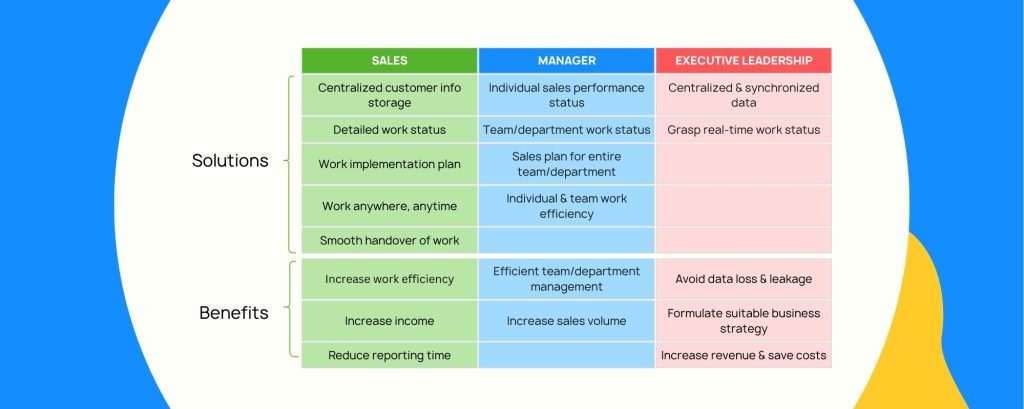
Plenty of B2B companies still run sales on Excel — and that’s fine, until the team grows or the sales cycle gets longer. This article rounds up the real CRM benefits, compares CRM vs Excel head-to-head, and pinpoints exactly when a business needs to make the switch.
“What does CRM actually give you that Excel doesn’t?” sounds like a simple question — but it’s the exact question that sinks a lot of CRM rollouts in Vietnam before they even get past the internal buy-in stage. In sales, one factor decides how a team operates and what technology it needs: the sales cycle. With a short cycle — closing within a month, low contract value — building deep customer relationships doesn’t matter as much, and applying CRM is straightforward. But with a long cycle — stretching months or even years — evaluating a Relationship Manager’s (RM) performance gets far more complex, and that’s exactly where CRM benefits start to pull ahead of Excel.
With long sales cycles, managers often lose patience when reps miss targets for months in a row. To confirm reps are “still working,” they ask for logs of every meeting, email, text, and call. That exact need is what gave rise to sales CRM (Sales Force Automation). But RMs tend to be experienced people who don’t want to be “micromanaged” by having every call counted to judge their performance. They resist, and find every reason not to use CRM — a major reason so many CRM projects fail.
But from a management point of view, the cost of “not using” CRM is far bigger: no customer information for proper follow-up care, no clean handoff of accounts when an employee leaves, no accurate revenue forecasting, and a skewed read on the team’s real capabilities.
Key takeaways
- There are 11 CRM benefits split across three groups — sales reps, mid-level managers, and leadership — each solving a different problem.
- The biggest competitor to a professional CRM isn’t other software — it’s Excel. Comparing CRM vs Excel, the core differences come down to collaboration, consistency, and timeliness — three things Excel was never built to do well.
- Every $1 invested in CRM generates $8.71 in revenue on average (Nucleus Research), yet over 40% of sales reps still keep customer data scattered across Excel or email (HubSpot).
- The biggest obstacle to CRM adoption isn’t technology — it’s the sales team’s fear of “being monitored,” and it has to be handled correctly or the rollout fails.
CRM vs Excel: When Does Excel Stop Being Enough?
This is the question most businesses ask before deciding to invest: if Excel is doing the job managing sales, why add CRM software at all? In practice, the biggest competitor to a professional CRM really is Microsoft Excel. Excel can log deals, customer information, contract value, deal stage — all of it.
The answer comes down to what each tool was built for: Excel is personal software, while CRM exists to serve collaboration, consistency, and timeliness — three things even a well-designed Excel file struggles to deliver once a team grows past a handful of people.
Once these three criteria are clear, Excel’s limits — and the case for a dedicated CRM — become obvious on their own.
11 CRM Benefits, Across 3 Groups
We’ve rounded up 11 core CRM benefits, grouped by the three roles most affected: sales reps, mid-level managers, and leadership.
Group 1: CRM Benefits for Sales Reps
A sales rep’s goal is to sell more and work more efficiently. Think of each rep as a small “startup,” and CRM as the tool that helps that startup run better:
1.Automates Repetitive Tasks
CRM cuts down time spent on manual data entry, writing follow-up emails, and building reports by hand — work that eats up hours every day without directly generating revenue.
2.Effective Pipeline Management
CRM shows exactly which opportunities are at which stage, and which ones need attention first — instead of a rep having to keep it all in their head.
3.More Time on “Real” Selling Work
Once administrative tasks are automated, reps have more time to consult, meet, and close with customers — the work that actually creates value.
4.Higher Earnings From Working More Efficiently
Working more efficiently means hitting and exceeding quota more easily, which naturally lifts a rep’s income — no extra pressure required.
Group 2: CRM Benefits for Mid-Level Managers
This group’s goal is managing team performance effectively. CRM helps them:
5.Get a Clear Overview (Dashboard)
Instead of chasing everyone for their Excel file and merging it by hand, a manager can pull up real-time reporting anytime, on a single dashboard.
6.Accurate Performance Evaluation
Consistent data across every rep makes it possible to fairly compare and evaluate performance, instead of relying on gut feel or verbal updates.
7.Coach the Team Where It Matters
CRM helps pinpoint weak spots in the sales process — for example a high drop-off rate at the demo stage — so managers can coach the right person on the right problem, at the right time.
8.Sales Forecasting
CRM gives you the data foundation to forecast next month’s or next quarter’s revenue more accurately, based on real pipeline data instead of gut-feel estimates.
Group 3: CRM Benefits for Leadership
Why does a car need a speedometer and a fuel gauge, while a bicycle doesn’t? Because speed and risk are different. If a business runs on Excel, sales information isn’t updated in real time.
9.Data-Driven Decisions
CRM lets leadership see the “health” of the entire sales system in real time, so they can act early instead of reacting once it’s already too late.
10.Secure, Centralized Data
Customer data is a business’s most important asset. CRM prevents data loss when an employee leaves — everything stays centralized, synced, and access-controlled.
11.Optimizes the Entire Process
CRM helps identify bottlenecks across the whole journey — from Marketing to Sales to Customer Service — so a business can improve the process company-wide, not just within one department.
CRM Is a Culture for Sustainable Growth
The benefits of CRM are clear: lower costs, higher revenue, higher profit, stronger customer trust, and a more professional team. But above all, using CRM builds a habit — a data-driven work culture — that lets a business survive and grow sustainably, instead of depending on individual employees’ memory and personal habits.
Applying This in Vietnamese Businesses
In Vietnam, most B2B businesses are still at the stage of using Excel or a basic CRM. In industries with long sales cycles — manufacturing, construction, chemicals, distribution — CRM benefits show up most clearly, because that’s exactly where Excel’s limits on collaboration, consistency, and timeliness start to show.
OplaCRM helps sales teams engage customers more intelligently through its Health Score feature — a detailed assessment of the “health” of every customer relationship, helping a business spot the best sales opportunities and focus on its most valuable customers. This is especially useful for B2B businesses with long sales cycles, where getting the timing and the target right matters more than the sheer number of touches.
Experience the Benefits of CRM With OplaCRM
OplaCRM helps B2B sales teams in Vietnam move from scattered Excel files to one centralized, synced, real-time data system — the foundation behind all 11 CRM benefits above.
Frequently Asked Questions
 What are the benefits of CRM?+
CRM benefits span three groups: sales reps (task automation, pipeline management, higher earnings), mid-level managers (real-time dashboards, accurate performance evaluation, coaching, sales forecasting), and leadership (data-driven decisions, secure and centralized data, process optimization). Altogether that’s 11 core benefits across all three groups.
How is CRM different from Excel?+
Excel is personal software, well-suited when one person manages their own data alone. CRM is built for collaboration across people, consistency in how data is entered and stages are defined, and timeliness when you need aggregated data instantly. Once a sales team grows past a few people or the sales cycle stretches beyond a month, these differences become real limits of Excel.
Can Excel replace a CRM?+
For a very small team with a short sales cycle, Excel can get by for a while. But Excel has no real-time sync, doesn’t automatically log interaction history, and depends on everyone updating it correctly and consistently. Once a business needs accurate revenue forecasting, smooth account handoff when an employee leaves, or fair performance evaluation across many reps, Excel stops being enough.
When should a business move from Excel to CRM?+
The clearest signal is when pulling a report together from multiple Excel files takes hours or days, when customer data disappears along with departing employees, or when a manager can’t know the real status of a deal without asking the sales rep directly. That’s also usually the point where the sales cycle is long enough and the team large enough that CRM benefits clearly outweigh the cost of rolling it out.
Why do sales reps often resist using CRM?+
Most Relationship Managers are experienced people who don’t want to be “micromanaged” by having every call and email counted to judge their performance. That resistance is a common reason CRM projects fail. The fix isn’t dropping CRM — it’s rolling it out as a tool that helps reps sell better, not as a surveillance tool.